
In this article, I want to explore three of the best Linux distributions for beginners, and which ones should be avoided. I wrote a VERY long article with detailed reviews of about a dozen distros, but instead of posting that, I’ll provide a summary. Unfortunately, you’ll often find very bad advice on the internet about switching from Windows to Linux. What I mean by that is many people on places like Reddit seem fixated on pushing their favorite distro no matter how difficult it is to use. Here I want to provide suggestions that work out of the box. Not everyone wants keeping up with their computer to become a hobby.
But first, let’s get some definitions out of the way:
- Distribution: (aka “distro”) is a complete operating system package built around the Linux kernel. It’s a ready-to-use version of Linux that includes the core system plus a collection of pre-selected software, a desktop, and installation tools.
- Desktop Environment: (aka DE) is the graphical interface that you interact with. If the core of the distro itself is like the engine of a car, then the DE is like the body style of the car.
Plasma DE: If You Want Something That Looks Like Windows 10

If you want a Windows 10-inspired look and feel, then I recommend a system with the Plasma DE. The two most commonly used ones are:
- Kubuntu: It has the stability, reputation, and wide-spread support of Ubuntu, but with a user interface that’s more familiar for people coming over from Windows.
- Fedora KDE: Fedora is known as the most secure Linux distro for beginners. Getting up and running with it is not quite as quick and easy as Kubuntu, but if security is a top priority to you, then it may be worth considering.
Mint: If You Want Something Extremely Stable
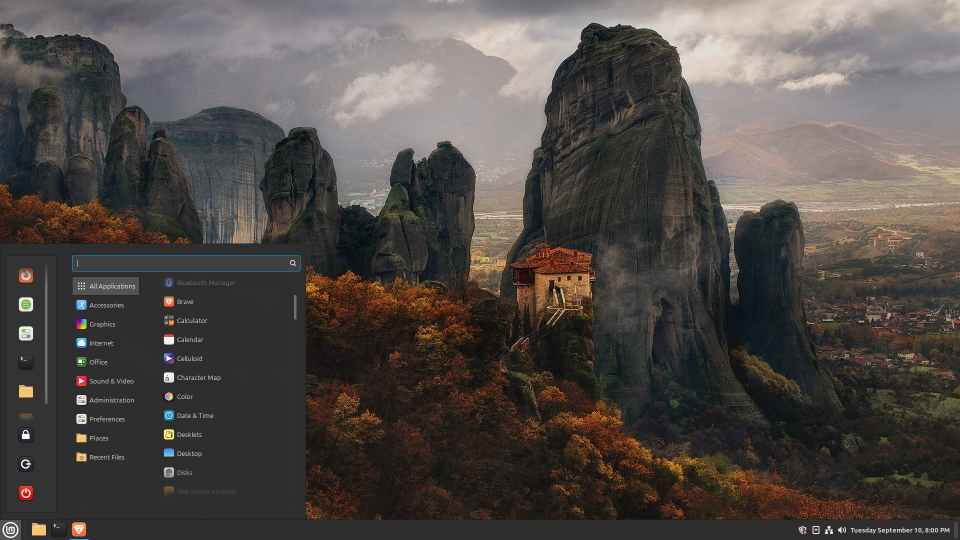
I’ve used Linux Mint far more than any other distro. While Mint’s Cinnamon desktop is bland by default (you can make it look good with tweaks), it’s reliable, stable, and “just works” more consistently than any other Linux distro that I’ve used (including with accessories such as printers and webcams). People often say it has a “traditional” or “classic” look, which I think means it looks and feels a bit like Windows 7. It is light on resources, so it will often work well with older computers.
However, if having a more modern-looking OS is of the utmost importance to you, then I’d recommend either Plasma (above) or Ubuntu (below).
Ubuntu: The Most Popular Option

Ubuntu’s default DE is called Gnome, which with some tweaks, can look a bit more like macOS than Windows. Some people love that, others hate it. If you want something that feels more like Windows but more modern than Mint, then I’d recommend option above (Kubuntu or Fedora KDE). But if you’re open to something a bit different, then you may find Ubuntu to be a fun experience.
You’ll notice with both Kubuntu and Ubuntu that there are various versions you can download. As of the publishing of this article, there is 24.04 LTS (Long Term Support) and 25.10 (which only has about nine months of support from its release date). I usually recommend the LTS versions since they’re the most stable and usually best for beginners. But feel free to try either one.
Honorable Mentions
- Zorin used to be in my top three recommendations, but things have not been going well with their latest release of Zorin 18. I used Zorin 16 and 17 for several months and enjoyed it. If you do want to try Zorin, I’d recommend going with 17 Core. They sell a “Pro” version of their OS, but it’s not substantially different from the Core version. The main differences are that in Pro they bundle a bunch of software that you can easily get for free and they have some additional desktop layouts you can choose from. If you try out Core and find everything works well for you after a few weeks, then you might consider paying for Pro. Just be aware that compatibility with accessories (printers, etc.) and system stability are no different between Core and Pro.
- Mint XFCE is excellent for old hardware. I’ve got it on a computer that’s over fifteen years old and that system works great.
- Q4OS has two releases: one with the Plasma desktop and the other with Trinity desktop. Both are customized to excel on older hardware, but the Trinity desktop is especially light weight. If you have an old XP-era computer, then you may have fun experimenting with Linux by using this distro. The look and feel are very reminiscent of Windows 7.
Distros to Avoid
This will likely offend some long-term Linux users, but that’s ok. I think many of them are so out of touch with what people need when they’re coming over from Windows 10 that they’re not good sources of information. My approach here is to help the average computer user who just wants an operating system that works out of the box with little or no tweaking. The distros below are all excellent, but they’re geared toward more advanced users.
- OpenSUSE advertises itself as being user-friendly, but I had numerous problems with it. For example, downloaded files have to be installed from the terminal, and even after doing that, there’s no guarantee they’ll work. Their latest version, Leap 16, has received a lot of negative feedback from its user base.
- Arch is an excellent distro for the technologically advanced who want to spend lots of time tweaking their system to make it work. I tried EndeavorOS, which could be called Arch for Dummies. It was far more technical than I was expecting and I couldn’t do basic tasks without in-depth knowledge of the terminal. However, if you’re a gamer, SteamOS would be worth your time to get set up.
- Manjaro wasn’t any better. One of their developers mentioned in a forum that they expect a higher-than-average level of expertise and work from their user base. If you use a Manjaro system, you’ll need to keep a frequent eye on their forums to make sure you’re keeping up with changes that need to be implemented.
Again, all the above distros are excellent, but my focus is on recommending systems that work out of the box for beginners. Most people don’t want their computer OS to become a hobby in order to maintain.
Summary
The distros that I outlined above (Kubuntu/Fedora, Mint, and Ubuntu) are my top recommendations for newcomers. They install fairly easily and are the least difficult for those coming over from Windows. For newbies, I usually recommend distros that are in the Debian stream (meaning they have Debian or Ubuntu as their base) because they have the most support online.
2 responses to “The Best Linux Distros for Beginners”
I’ve not fully made the transition from Win10 to Linux yet, but I’ve put Mint on many older computers and some servers and have enjoyed it. Still adjusting to some of the differences, especially finding alternatives for various programs, but I like it better. I especially like using it for servers, including a home media server, and I trust it a lot more than Windows. When Win10 goes end of support in October, instead of moving to Win11, I will likely transition my main computer to Mint.
I’m happy it’s working out for you! It does take a bit of adjusting, especially with finding similar programs. But the feeling that your OS isn’t spying on you is huge!